Arcade POS System: Features, Benefits & How to Choose the Right Software
Running an arcade involves more than collecting payments. Operators need to sell game cards, recharge player accounts, manage promotions, process transactions, and keep track of daily sales. When these activities rely on separate tools or manual processes, it becomes harder to maintain an efficient and consistent customer experience.
An arcade POS system brings these sales activities together. Designed for the way entertainment venues operate, it can connect front-desk transactions, cashless payments, game card accounts, and sales reporting in one workflow.
But what should operators look for when choosing a point-of-sale solution? This guide explains how arcade POS software works, its essential features, and how to evaluate a system that fits your venue.
What Is an Arcade POS System?
An arcade POS system is a point-of-sale solution designed to manage sales and payment transactions in arcades, family entertainment centers (FECs), and other entertainment venues.
Unlike a standard retail checkout system, an arcade POS may need to handle more than physical products. It can process game card purchases, credit top-ups, play packages, memberships, food and beverage sales, and other venue transactions.
Depending on the software and configuration, an arcade point of sale system may include:
- Game card sales and recharge
- Cashless payment processing
- Product and package management
- Membership and customer account transactions
- Discounts and promotional offers
- Cashier and employee permissions
- Receipt printing and cash drawer integration
- Transaction history and sales reports
The main purpose is to make daily sales easier to manage while connecting customer transactions with the venue's wider operating system.
How Does an Arcade POS System Work?
A typical POS workflow begins when a customer makes a purchase at the front desk.
1. Select a Product or Service
The cashier selects the required item or service through the POS interface. This could be a new game card, a credit package, a membership, an admission ticket, or a food and beverage item.
Product buttons, pricing rules, and available packages can be configured according to the venue's business model.
2. Process the Customer's Transaction
The cashier confirms the selected items and the total amount. If the transaction involves an existing game card, the system may identify the customer's account and apply the selected recharge or service.
For example, a customer can purchase a game card and add credits in the same transaction, depending on the system configuration.
3. Complete Payment
The customer pays using an available payment method. Depending on the POS hardware and payment integration, this may include cash, bank cards, contactless payments, or supported local payment methods.
The system records the transaction and processes the corresponding account or sales update.
4. Update Records and Generate Reports
After the transaction is completed, the POS records relevant sales information.
Connected software can make this information available for transaction history, cashier reconciliation, sales reporting, and customer account management.
This helps operators understand what has been sold, how payments were processed, and how each sales channel contributes to venue revenue.
Key Features of Arcade POS Software
Not every venue needs the same POS functions. The right configuration depends on the types of attractions, products, payment methods, and customer transactions involved.
1. Game Card Sales and Recharge
Game card transactions are a central part of many modern arcades.
An arcade POS should support the sales and recharge workflows required by the venue. Staff may need to issue new cards, add credits, select top-up packages, or review card-related transactions.
When connected to the arcade card system, the POS can help ensure that purchased credits are reflected in the customer's account and available for use at compatible game readers.
2. Cashless Payment Integration
Cashless payments allow customers to use supported digital payment methods instead of relying entirely on cash.
For arcade operators, payment integration should work smoothly with the sales process and transaction records.
Before choosing a solution, check which payment terminals and providers are supported. International venues should pay particular attention to local payment methods, currencies, settlement arrangements, and integration requirements.
3. Product and Package Management
Arcades often sell more than individual game credits.
A flexible POS should make it possible to manage different products and packages, such as:
- Game credit bundles
- Promotional recharge packages
- Membership products
- Admission or attraction tickets
- Food and beverages
- Merchandise and retail items
Configurable pricing and promotions can help operators respond to different customer segments and purchasing occasions.
4. Membership and Customer Management
Customer accounts can connect sales activity with membership information.
Depending on the system, staff may be able to register customers, process membership purchases or upgrades, review account information, and apply eligible benefits.
This creates opportunities to build loyalty programs and encourage repeat visits.
For venues that want to understand customer behavior, connecting transaction records with customer profiles can also provide more useful sales insights.
5. Employee Permissions and Shift Management
A POS is used by different employees throughout the day. Operators should be able to manage cashier accounts and define permissions according to job responsibilities.
Useful functions may include individual staff logins, transaction records, discount permissions, shift summaries, and cashier settlement.
These controls help improve accountability and make daily front-desk management more consistent.
6. Sales Reporting and Transaction History
Sales reports help operators understand business performance beyond the total amount collected at the counter.
Depending on the software, reporting may cover:
- Daily and monthly sales
- Revenue by product or package
- Payment method breakdown
- Cashier transaction summaries
- Recharge and card sales records
- Promotional sales performance
Accurate transaction records also make it easier to review discrepancies and reconcile payments.
Benefits of Using an Arcade POS System
1. Faster Front-Desk Transactions
A well-organized cashier interface can simplify common purchases and reduce repetitive manual steps.
Staff can select products, process payments, and complete card-related transactions through a consistent workflow.
This can help reduce waiting time during busy periods and improve the overall customer experience.
2. Better Control Over Sales Activities
When sales are recorded in a centralized system, operators have a clearer view of transactions across their venue.
Instead of relying on separate spreadsheets or manual summaries, managers can review sales records and compare performance across products, services, and payment methods.
3. More Flexible Promotions and Packages
A venue may use different pricing strategies for weekdays, weekends, special events, or membership customers.
Configurable packages and promotions give operators more flexibility when designing offers.
For example, a recharge bonus or bundled game credit package can encourage customers to purchase more value in one transaction.
4. Improved Customer Experience
Customers want a convenient way to purchase game credits, pay for services, and enjoy attractions.
By connecting card sales, payments, and customer accounts, an integrated POS workflow can reduce unnecessary steps at the front desk.
Staff can also spend less time handling repetitive transactions and more time assisting visitors.
5. More Consistent Operational Data
When sales, payments, and customer transactions are recorded through connected software, managers can use the resulting information to make better operational decisions.
The value is not just having more reports. It is having consistent records that help operators understand where revenue comes from and how customers interact with the venue.
Arcade POS System vs. Traditional Retail POS
A standard retail POS can handle product sales and payment processing. However, arcades often have additional requirements related to stored game credits, player cards, and gameplay transactions.
AreaTraditional Retail POSArcade POS SystemProduct salesYesYesGame card rechargeUsually requires integrationSupported when configuredPlayer account transactionsLimited by defaultDesigned for connected card workflowsCashless gameplay integrationNot a standard functionCan connect to compatible card systemsMembership transactionsDepends on softwareMay support venue membership workflowsArcade-specific reportingLimitedCan include card and recharge sales
A retail POS may still be suitable for a small venue with simple sales requirements. However, operators using cashless game cards or multiple entertainment services should evaluate whether a purpose-built arcade solution offers the necessary integrations.
How Does an Arcade POS Connect with Other Systems?
A POS system is most useful when it works as part of a connected venue technology setup.
A typical arcade environment may include:
- Arcade Card System: Manages player cards, stored credits, and gameplay transactions.
- Arcade Card Readers: Identify player cards and authorize gameplay on compatible machines.
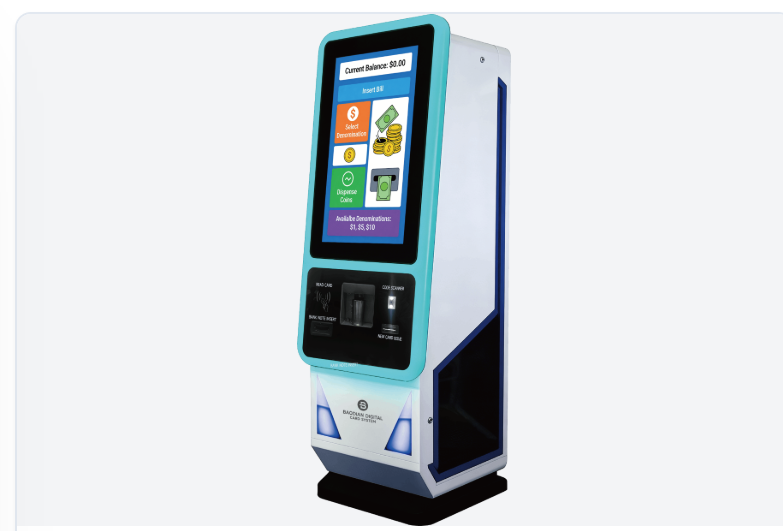
- Self-Service Kiosks: Allow customers to purchase or recharge cards independently.
- Ticketing System: Manages admission sales and ticket-related transactions where supported.
- Membership System: Maintains customer profiles, membership levels, and benefits.
- Management Software: Connects sales records and operational information for venue-level oversight.
For example, a customer may recharge a game card at the front desk through the POS or use a self-service kiosk. The updated balance can then be used at compatible game readers.
This connected workflow reduces the need to manage each transaction channel separately.
However, integration capabilities vary between providers. Operators should confirm which systems are included, which require additional modules, and whether third-party integrations are supported.
How to Choose the Right Arcade POS System
Before purchasing, evaluate the system against your venue's actual sales and operational requirements.
1. Understand Your Sales Model
List the transactions your venue needs to manage. A small arcade may mainly need game card sales and recharges, while a larger FEC may also require admission tickets, memberships, food and beverage sales, and retail transactions.
Choose a solution that matches your current business model without paying for unnecessary functions.
2. Check Card System Compatibility
If you already use cashless game cards, verify that the POS can connect to your existing card management platform.
Confirm how card balances, recharge transactions, customer accounts, and gameplay records are handled.
3. Review Payment Support
Check the supported payment terminals, payment providers, currencies, and local payment methods.
For overseas venues, payment compatibility should be confirmed before implementation rather than assumed from a product demonstration.
4. Evaluate Reporting and Staff Controls
Review the available sales reports, transaction history, cashier permissions, and shift settlement functions.
The system should provide enough visibility for managers to monitor sales and handle daily reconciliation.
5. Consider Integration and Scalability
Think about future requirements such as additional kiosks, more game machines, new attractions, or multiple venue locations.
A connected system with suitable integration options can make future expansion easier, but the exact capabilities should be verified with the supplier.
6. Ask About Implementation and Support
Before making a decision, discuss installation, data migration, employee training, technical support, software updates, and maintenance.
A POS system is part of daily venue operations, so ongoing support matters just as much as the initial hardware and software.
Conclusion
An arcade POS system does more than process payments. It helps entertainment venues manage game card sales, credit recharges, memberships, product sales, and daily transactions through a more organized workflow.
For operators, the right solution should fit the venue's sales model, support the required payment methods, and connect with the arcade card system and other operational tools.
Rather than choosing a POS based only on its checkout interface, evaluate how well it connects customer transactions with the rest of your venue. A well-integrated system can provide a more convenient experience for customers and clearer control over daily sales.
Frequently Asked Questions
What is an arcade POS system?
An arcade POS system is a point-of-sale solution designed for arcades and entertainment venues. It can manage transactions such as game card sales, credit recharges, payments, memberships, and other venue purchases.
What is the difference between an arcade POS and a regular POS?
A regular POS mainly handles product sales and payments. An arcade POS may also support game card transactions, stored credits, cashless gameplay integration, and arcade-specific sales workflows.
Can an arcade POS system recharge game cards?
Yes, when the POS is connected to a compatible arcade card system. Staff can process card top-ups and other supported account transactions through the sales interface.
Can an arcade POS system support cashless payments?
Many arcade POS solutions can integrate with supported cashless payment terminals and providers. Available payment methods depend on the hardware, software, and destination market.
Does an arcade POS system include management software?
Some solutions are part of a broader arcade management platform, while others focus mainly on point-of-sale functions and connect to separate systems. Confirm the included modules and integration scope before purchasing.
Is an arcade POS system suitable for a family entertainment center?
Yes. An appropriately configured solution can support game card sales, payments, memberships, and other transactions in an FEC. Venues with multiple attractions should also evaluate ticketing, bookings, food and beverage, and reporting requirements.